

More and more emergency call devices are being passed on – within families, among friends or even between neighbours. At SmartLife Care, we explicitly welcome this approach. It is sustainable and makes good sense.
On average, our devices are reused two to three times – a clear sign of quality and responsible use.
A real-life example
In one neighbourhood, an emergency call device was used by six different people on the same street over several years.
Whenever it was no longer needed – for example, because someone moved into a care home or wanted to spend their final days at home – the device was passed on to the next person.
“With the emergency call device, my mum was able to move into a care home later than she would have without it.”
“Thanks to the emergency call device, we were able to fulfil our father’s wish to spend his final days at home.”
Safety can be passed on – provided the system is working properly.
Is your device still operational?
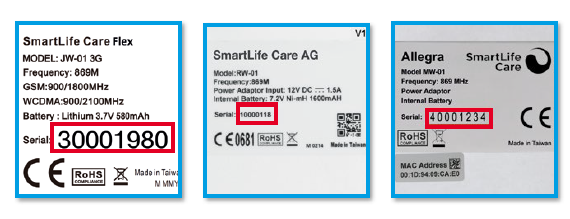
One way to determine whether an emergency call device is still operational is by checking its serial number.
An important point:
Older devices use 3G technology. As the 3G network was shut down at the end of 2025, these devices are no longer operational.
The battery in the emergency call transmitter (wristband or pendant) also has a limited lifespan. Therefore:
➡️ Be sure to test the transmitter with a test alarm.
➡️ If necessary, replace it with a new accessory (shop.smartlife-care.ch).
3G devices (no longer operational)
The following serial numbers belong to the older 3G generation and are no longer supported:
- Serial number starts with 1000
- Serial number starts with 2000
- Serial number starts with 3000 or 3001
- Serial number starts with 4000
These devices can no longer trigger emergency calls.
4G devices (still operational)
These devices are equipped with current technology and can still be used:
- Serial number starts with 1002
- Serial number starts with 2002
- Serial number starts with 3002 or 3100
- Serial number starts with 4002
- Serial number starts with 5002
- Serial number starts with 9000
Registration in the Customer Center
Once you have checked the serial number and confirmed that the device is compatible, there is nothing standing in the way of using it again.
The device can be registered as usual in our Customer Centre.
Important:
Make sure that the previous user has cancelled their subscription. Otherwise, the device cannot be registered again.
Step by step: How to set up a used device correctly
- Check the serial number
Check whether the device is a compatible 4G device. - Check the device
Visually inspect the device to ensure that it is in good condition and functioning properly. - Clarify the previous subscription
Make sure that the device is no longer linked to an active subscription. - Register in the Customer Centre
Register the device to the new user and enter their emergency contacts. - Activate and test the system
Check the connection and be sure to perform a test alarm.
Important information
A quick test after setup is essential:
Only then can you be sure that everything will work reliably in an emergency.
We also recommend repeating the test once a month.
This keeps the procedure familiar, provides reassurance and helps reduce any hesitation in an emergency.

Sabina Crameri
| Chief Marketing Officer, Head of Business Development and Deputy CEO at SmartLife Care AG | Expert in Personal Emergency Response Systems (PERS), Customer Insights, Gerontology and Ageing in Place |